On this page
What Is Transactional Email?
Transactional email is an automated one-to-one message sent because a person did something, such as placing an order or asking for a password reset, and it is expected and needed, not promotional. Receipts, password resets, shipping updates and security alerts are the usual examples.
Most people meet the term when something breaks. A password reset never arrives, a receipt goes to spam, and suddenly someone is asking what a "transactional email" is and why it's different from the newsletter that always lands fine. So here's the plain version: what counts, what doesn't, how your app actually sends one, and why a service is usually involved.
What is transactional email?
A transactional email is an automated message that one person receives because of something they just did or something that happened to their account. If it passes three tests, it's transactional:
- Triggered by an action. A sign-up, a purchase, a reset request, a failed payment. Nobody scheduled it for Tuesday at 9 a.m.
- Sent to one person. The content is about that person's account or order, not a list.
- Expected and needed. The recipient is waiting for it, or needs it to use the product.
Fail any of the three and you're probably looking at marketing email. A newsletter goes to a list, on your schedule, to sell or inform. The difference matters for law, for sending reputation and for how you build things, and we cover it in transactional vs marketing email.
Types of transactional emails
Transactional emails fall into six groups, and most products send at least four of them. Here's the whole map, one line each. (Subject lines below are ours, written as examples.)
| Type | Trigger | Example subject line |
|---|---|---|
| Account: welcome, verification, password reset, login alert | Someone signs up, verifies an address, asks to reset a password or signs in from a new device | "Reset your password" |
| Orders and payments: confirmation, receipt, shipping, refund | A purchase, a shipment update or a refund | "Your order #4821 is confirmed" |
| Subscription and billing notices | A renewal, a failed card, a plan change | "Your card was declined: update it to keep your plan" |
| Security alerts | A new login, a changed email address, a suspicious attempt | "New sign-in from Chrome on Windows" |
| System notifications | A usage limit reached, a job finished or failed | "Your export is ready" |
| Support replies | A person writes to support and gets an answer | "Re: Your question about invoices" |
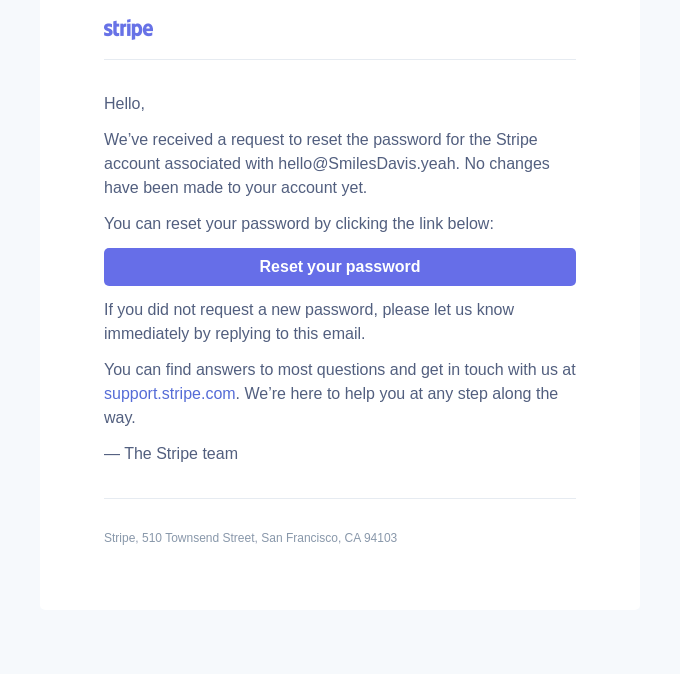
Design and copy are a different job. For what good ones look like, see transactional email examples.
How transactional emails are sent
A transactional email is sent by your application calling a sending service, which delivers the message and reports back what happened. The flow has four steps:
- An event happens in your app. A user clicks "Forgot password" or completes checkout.
- Your app calls a sending service. It makes an API request or opens an SMTP connection with the recipient, subject and content (or a template ID).
- The service delivers the message. It signs it, connects to the recipient's mailbox provider and retries if the first attempt is deferred.
- Status events come back. The service reports delivered, bounced or complained, usually through webhooks, and keeps a log you can search.
API or SMTP? An email API is an HTTPS request your code sends, with structured fields, clear errors and easy access to tracking data. SMTP is the older protocol every mail library and CMS already speaks, so it's the quick route when you can't change the code. All seven services we rank offer both. More in what an email API is.
Why deliverability matters for transactional email
If a transactional email lands in spam or never arrives, the person can't finish what they came to do. A reset link that doesn't show up means a locked-out user, a repeat request and often a support ticket. Nobody ignores a missing receipt either. Marketing mail can slip a day and nobody notices; this kind can't.
Three habits do most of the work:
- Authenticate your domain. Google's sender rules require SPF or DKIM for everyone sending to Gmail, and DMARC on top for senders of 5,000 or more messages a day (Google Workspace Admin Help, checked November 2026). See SPF, DKIM and DMARC explained.
- Keep transactional mail on its own stream. A separate stream, IP or subdomain stops a bad newsletter from dragging your password resets down with it.
- Handle bounces. Stop sending to addresses that hard-bounce or report spam. A service does this with a suppression list; otherwise your reputation takes the hit.
Depth lives in what email deliverability is. For how the seven services compare on the tooling, see the deliverability section of our ranking.
What a transactional email service does
A transactional email service is a hosted platform that sends your application's emails for you and handles delivery, reputation and tracking. You can run your own mail server, but you'd own IP reputation, retries, bounce handling and monitoring. Here's what a service gives you:
- Delivery infrastructure: servers and IPs that already have a sending history, reachable by API or SMTP.
- Reputation management: authentication setup, and for larger senders dedicated IPs and warm-up.
- Events: webhooks that tell your app when a message bounced or was delivered.
- Logs: a searchable record to answer "I never got the email."
- Templates: stored, reusable layouts so non-developers can edit copy.
- Suppression: automatic blocking of addresses that bounced or complained.
Transactional email service providers
These are the seven transactional email service providers we rank, and how each covers the basics above, from each vendor's own pricing page and docs (checked November 2026). Log retention is how long message logs stay available, and it varies by plan.
| Service | API and SMTP | Event webhooks | Log retention | Automatic suppression |
|---|---|---|---|---|
| Mailtrap | Yes | Yes | 3 days (Free) to 30 days (Enterprise) | Yes |
| Amazon SES | Yes | Via event publishing to Amazon SNS | No per-message log kept by SES; events go to your own destination | Yes |
| Mailgun | Yes | Yes | 1 day (Free, Basic) to 30 days (Scale) | Yes |
| Resend | Yes | Yes | 30 days (Free, Pro, Scale) | Yes |
| SendGrid | Yes | Yes (Event Webhook) | Up to 30 days with the Email Activity history add-on | Yes |
| MailerSend | Yes | Yes | 1 day (Free, Hobby) to 30 days (Professional) | Yes |
| Postmark | Yes | Yes | 45 days by default (paid Basic and above) | Yes |
Everyone checks the boxes, so the real differences are in the details: how long logs last on the plan you'll pay for, and what you must wire up yourself (SES is the clearest case). Prices, free tiers and our verdict are in the full ranking. We have no comparison of template editors yet, so we left that column out rather than guess.
Do transactional emails need an unsubscribe link or consent?
Under US law, usually not: the FTC says transactional or relationship messages are exempt from most of the CAN-SPAM Act, though they still may not contain false or misleading routing information (FTC CAN-SPAM compliance guide, edited January 2024). The exemption is narrow, and a message that mixes in promotion is judged by its primary purpose, so read transactional vs marketing email for the full rules, including consent outside the US.
Transactional email: FAQ
What is an example of a transactional email?
A password reset, an order confirmation and a shipping notification are three common examples. Each is triggered by something the person did, sent to them alone and needed by them. See our transactional email examples for designs and copy.
What are the types of transactional emails?
Account emails (welcome, verification, password reset, login alert), orders and payments (confirmation, receipt, shipping, refund), subscription and billing notices, security alerts, system notifications and support replies. The types table above has a trigger and example for each.
Is a welcome email transactional?
Usually yes, when it's sent right after sign-up and confirms the account. Once it starts promoting offers or products, it moves toward marketing, and CAN-SPAM treats a mixed message by its primary purpose. The detail is in transactional vs marketing email.
Is a newsletter a transactional email?
No. A newsletter is sent to a list on your schedule, not triggered by one person's action, so it's marketing email. See transactional vs marketing email.
Do transactional emails need an unsubscribe link?
Under US CAN-SPAM, purely transactional messages are exempt from most of the Act, including the unsubscribe requirement for commercial email. A message that also promotes something is judged by its primary purpose. The full rules, including non-US ones, are in transactional vs marketing email.
How are transactional emails sent?
Your application sends each one through a sending service, using an API request or an SMTP connection. The service delivers it and reports back with webhooks and logs. See what an email API is.
What is a transactional email service?
A transactional email service is a hosted platform that delivers your application's emails and handles reputation, bounces, logs and tracking for you. Compare them in our best transactional email services ranking.