On this page
- What makes a transactional email example work
- Account emails: welcome, verification and password reset examples
- Email verification example
- Password reset email example
- Welcome email example
- Order and payment email examples: confirmation, receipt, invoice and refund
- Order confirmation email example
- Receipt and invoice email example
- Refund email example
- Shipping and delivery email examples
- Security and login alert examples: new login and password changed
- New login alert example
- Password changed alert example
- Subscription and billing notice examples: trial ending, payment failed and renewal
- System and support notification examples: usage limit, failed job and ticket reply
- How to turn a transactional email example into a working email
- FAQ
Transactional Email Examples
A good transactional email does one job in one screen: it confirms what the person just did, gives the detail they need, and shows the next step. The sample password reset, order confirmation and shipping emails below follow that pattern, with subject lines, body text and what makes each one work.
Most "examples" pages are galleries of screenshots. You can admire the layout, but you can't copy the words. So we did it the other way round: for each type of email, we wrote out a sample subject line and body text, then said why it works and what usually goes wrong.
One rule about the samples. Every subject line and body below is sample copy we wrote for a made-up shop called Acme. None of it is a real company's email. The screenshots are the opposite: real emails from real companies, credited and linked to where we found them.
What makes a transactional email example work
A transactional email example works when the reader can act on it in a few seconds, because they sent it themselves a moment ago by clicking something. Five traits show up in the good ones:
- A clear subject. It says what happened or what's needed: "Reset your Acme password", not "Important update".
- One purpose. One event, one email. A receipt that is also a newsletter does neither job well.
- The key detail in the first lines. Order number, amount, code expiry or tracking link goes at the top, not under a logo and a greeting.
- One main action. One button or link: reset, track, update card. Everything else is secondary text.
- Sender and reason visible. A recognizable From name and a line saying why they're getting this ("You asked to reset your password").
| Element | What to include | Sample |
|---|---|---|
| From name and address | Your product name, a stable address on your own domain | Acme Support, support@example.com |
| Subject line | The event and, if useful, a reference | "Your Acme order #10482 is confirmed" |
| Preheader (preview text) | The next sentence of the subject, not a repeat of it | "We'll email you again when it ships." |
| First lines | The key detail and the reason for the email | "You ordered 2 items on November 8. Total: $48.00." |
| Main action | One button with a verb | "Track package" |
| Support and context | How to get help, what to do if this wasn't you | "Didn't order this? Reply to this email." |
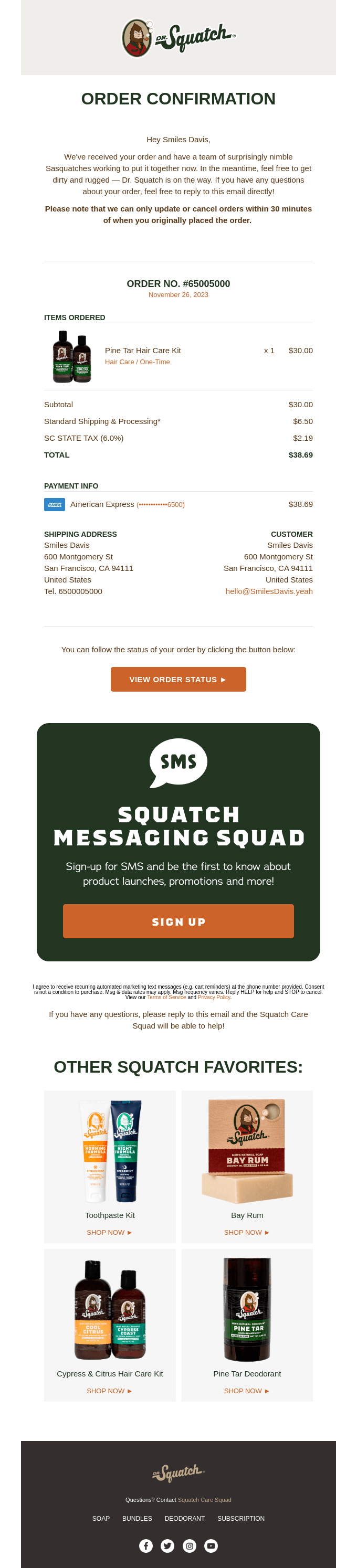
The examples below follow the same layout: trigger, sample subject line, sample body, why it works, and one mistake to avoid. For the definition of each type, see what is transactional email.
Account emails: welcome, verification and password reset examples
Account emails are the ones people wait for with the tab open, so speed and a single clear action matter more than design. For code-based sign-in and verification, see email APIs for OTP.
Email verification example
Trigger: the user submits the sign-up form.
Sample subject line: Confirm your email address for Acme
Sample body:
Hi Sam,
Confirm your email address to finish creating your Acme account.
[Confirm email address]
This link works for 24 hours. If you didn't sign up for Acme, you can ignore this email and no account will be created.
Why it works: the button is the first thing after the greeting, the expiry is stated, and the last line tells a wrong recipient what to do (nothing).
Mistake to avoid: a long welcome pitch above the button. The person came to confirm, so confirm first.
Password reset email example
Trigger: the user clicks "Forgot password".
Sample subject line: Reset your Acme password
Sample body:
Hi Sam,
Someone asked to reset the password for your Acme account. If that was you, use the button below.
[Reset password]
This link expires in 1 hour and works once. If you didn't ask for this, ignore this email; your password stays the same.
Why it works: it names the reason for the email, gives a limit on the link, and reassures the reader who didn't request it. OWASP's Forgot Password cheat sheet says reset tokens should be single use and expire after an appropriate period, and that you must never put the password itself in the email. It leaves the exact lifetime to you; 1 hour is our sample, not a rule.
Mistake to avoid: emailing a new password instead of a link. Also avoid a different web response for "account not found"; OWASP recommends the same message whether or not the account exists.
Welcome email example
Trigger: the account is created.
Sample subject line: Welcome to Acme, Sam
Sample body:
Hi Sam,
Your Acme account is ready. You signed up with sam@example.com.
[Go to your dashboard]
Need a hand getting started? Reply to this email and a person will answer.
Why it works: it confirms what happened, repeats the sign-up address so the owner can spot a typo, and gives one next step.
Mistake to avoid: turning it into a product tour with five links and a discount. The welcome email is borderline. Under US law the FTC's CAN-SPAM guide reads the transactional categories narrowly, and a message that leads with promotion can be treated as commercial. Our transactional vs marketing email guide covers where the line sits.
Order and payment email examples: confirmation, receipt, invoice and refund
An order or payment email is the customer's record that money moved, so the details matter more than the wording. People open these months later to find an order number or prove a charge.
Whatever the type, put the same fields where they can be found fast:
| Field | Why it's there |
|---|---|
| Order or invoice number | The first thing support will ask for |
| Items and quantities | Lets the buyer spot a wrong order |
| Total, with currency | The number people search their inbox for |
| Date | Matches the email to a card statement |
| Payment method (last four digits only) | Explains which card was charged |
| Support contact | The reply path when something is wrong |
We haven't listed legal requirements for receipts or invoices. They differ by country and by what you sell, so check with your accountant or the tax authority where you operate.
Order confirmation email example
Trigger: payment succeeds at checkout.
Sample subject line: Your Acme order #10482 is confirmed
Sample body:
Hi Sam,
Thanks for your order. We got it on November 8, 2026 and we're packing it now.
Order #10482 1 × Canvas tote, $24.00 1 × Enamel mug, $18.00 Shipping: $6.00 Total: $48.00 USD, paid with Visa ending 4242
[View your order]
Questions? Reply to this email.
Why it works: order number and total sit in the first screen, the items let the buyer verify the order, and the button leads to the full order.
Mistake to avoid: "Thanks for your purchase!" with no items or total. It forces the customer to log in to learn what they bought.
Receipt and invoice email example
Trigger: a payment is taken for a subscription or a one-off charge.
Sample subject line: Receipt from Acme, $19.00 (#R-2291)
Sample body:
Hi Sam,
We charged $19.00 USD to your Visa ending 4242 on November 8, 2026 for Acme Pro (monthly).
Receipt #R-2291
[Download PDF]
Billing questions? Reply to this email.
Why it works: amount, card and date are in the first sentence, and the PDF is one click away for expense reports.
Mistake to avoid: sending a receipt with no invoice number or date. Finance teams can't file it.
Refund email example
Trigger: a refund is issued.
Sample subject line: Your refund of $24.00 is on its way
Sample body:
Hi Sam,
We've refunded $24.00 USD for order #10482 to your Visa ending 4242.
Your bank decides how fast it shows up. It usually appears on your statement within a few business days.
Questions? Reply to this email.
Why it works: the amount and the order are stated plainly, and it sets an honest expectation about timing without promising a date you don't control.
Mistake to avoid: a vague "Your refund is being processed" with no amount. The customer will write to ask how much.
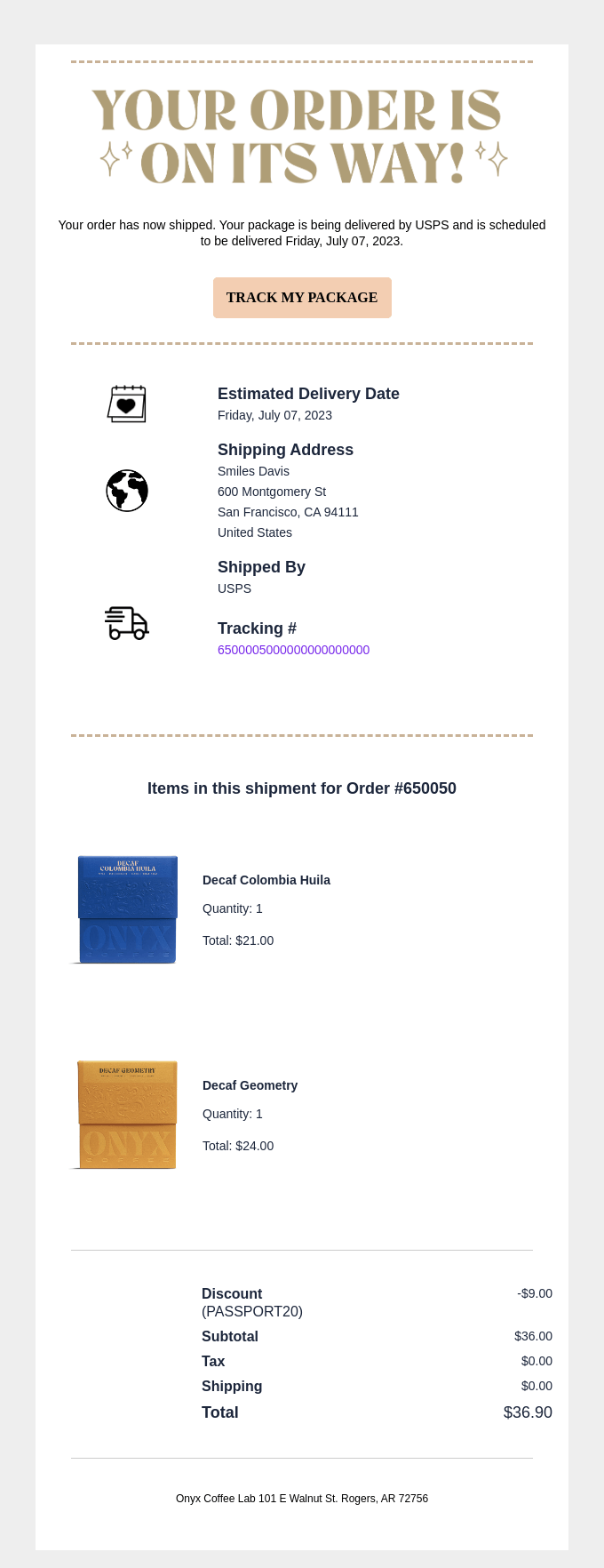
Shipping and delivery email examples
A shipping notification tells the buyer the order has left and gives them a way to follow it. Send it when the carrier scan happens, not hours later; the point is "it's moving now".
Trigger: a tracking number is created.
Sample subject line: Your Acme order #10482 has shipped
Sample body:
Hi Sam,
Your order is on its way.
Carrier: Example Post Tracking number: EX123456789 Estimated delivery: November 12 to November 14
[Track package]
Shipping to: 12 Sample Street, Springfield. Wrong address? Reply to this email right away.
Why it works: tracking link, carrier and delivery window are all above the fold, and the address is shown so a mistake can be caught while the parcel is still moving.
Mistake to avoid: a precise delivery date you can't keep. A range is more honest, and people remember a missed date.
Security and login alert examples: new login and password changed
A security alert exists to get a human to act within minutes, so it's the one email where urgency is earned. Say what happened, when, and from where, then give two paths: "this was me" and "this wasn't me".
What never goes in one: a password, a full card number, a one-time code that isn't the point of the email, or any link that logs the person in directly. Link to your own sign-in page and let them authenticate.
New login alert example
Trigger: a sign-in from an unrecognized device or location.
Sample subject line: New sign-in to your Acme account
Sample body:
Hi Sam,
We noticed a new sign-in to your Acme account.
Time: November 8, 2026, 14:32 UTC Device: Chrome on Windows Approximate location: Springfield, US
If this was you, no action needed.
If it wasn't: [Secure your account]
Why it works: it gives enough detail to recognize or reject the sign-in, and it makes the no-action case explicit so the alert doesn't cause panic.
Mistake to avoid: alerting on every sign-in. People learn to ignore alerts that fire constantly.
Password changed alert example
Trigger: the password was changed.
Sample subject line: Your Acme password was changed
Sample body:
Hi Sam,
The password for your Acme account was changed on November 8, 2026, 14:35 UTC.
If you made this change, you're all set.
If you didn't: [Lock my account] or reply to this email.
Why it works: it's short, it states the time, and it gives the owner a way to react. OWASP's cheat sheet also recommends sending this kind of notification after a reset.
Mistake to avoid: adding the new password or any hint of it "for convenience".
Subscription and billing notice examples: trial ending, payment failed and renewal
Billing emails can feel like bad news, so tone matters: factual, no scolding, and a clear way to fix it. Keep them about the account and the charge, not about upgrading.
| Notice | Sample subject line | Sample opening line |
|---|---|---|
| Trial ending | Your Acme trial ends on November 15 | "Your free trial ends in 3 days. To keep your projects, add a payment method." |
| Payment failed | We couldn't charge your card for Acme Pro | "Your payment of $19.00 didn't go through. Update your card to keep your plan." |
| Upcoming renewal | Your Acme plan renews on December 8 | "Your plan renews on December 8 for $19.00. Nothing to do unless you want to make a change." |
Why they work: each subject carries the date or amount, the first sentence states the consequence, and the one button fixes it ("Add payment method", "Update card", "Manage plan").
Mistake to avoid: a payment-failed email that sounds like a threat. Say what's affected and by when, then link to the fix.
System and support notification examples: usage limit, failed job and ticket reply
System emails keep people informed about what a product is doing on their behalf. They count as transactional when the reader's own action or account triggered them. Each of these is short on purpose.
Usage limit reached
Subject (sample): You've used 80% of your Acme storage Body (sample): Your account is at 8 GB of 10 GB. [View usage] or [Upgrade your plan].
Failed job or sync
Subject (sample): Your Acme export failed Body (sample): The export you started at 14:10 UTC didn't finish. We hit an error on row 2,310. [View details] or [Try again].
Support ticket reply
Subject (sample): Re: Billing question (#4821) Body (sample): Hi Sam, we've fixed the double charge and refunded $19.00. Reply here if anything looks off.
Why they work: the subject says what happened or which ticket, the body gives the number or the error, and there's one link to the place where it can be fixed.
Mistake to avoid: a failure email with no detail ("Something went wrong"). Say which job and what to try next.
How to turn a transactional email example into a working email
Turning an example into a working email takes three steps. It mostly comes down to copying the structure, not the words.
- Copy the structure. Keep the order: subject, key detail, one action, reason and support line. Change the wording to match how your product talks.
- Store it as a template. Put the layout in a template with variables for name, order number and amounts, so your code sends data and not hand-built HTML. See transactional email templates.
- Check it against the checklist. Run the finished email through transactional email best practices: authentication, plain-text version, bounce handling.
Then pick a service to send it. Our best transactional email services comparison covers price, deliverability tooling and AI readiness for the major options.
Transactional email examples: FAQ
What is an example of a transactional email?
A password reset, an order confirmation and a shipping notification are three common examples. Each is triggered by something the person just did and carries information they need: a reset link, an order total, or a tracking number. See our full set of samples above and what is transactional email.
What are the types of transactional emails?
Common types are account emails (verification, password reset), order and payment emails (confirmation, receipt, refund), shipping updates, security alerts, billing notices and system or support notifications. Our what is transactional email page defines each type.
What should a password reset email say?
It should say that someone asked to reset the password, give one button or link, state when the link expires, and say what to do if the reader didn't ask. It should never contain the password. OWASP's Forgot Password cheat sheet says reset tokens should be single use and expire.
What should an order confirmation email include?
Order number, items and quantities, total with currency, date, payment method (last four digits only) and a support contact, plus a link to the full order. Put the order number and total in the first screen. Legal requirements for receipts vary by country, so check local rules.
Is a welcome email a transactional email?
It's borderline. It confirms a sign-up, which looks transactional, but it often carries promotion. The FTC's CAN-SPAM guide judges a message by its primary purpose and says mixed messages are commercial if the transactional part doesn't come mainly at the beginning. See transactional vs marketing email.
What makes a good transactional email subject line?
It says what happened or what's needed and, where it helps, carries a reference: "Your Acme order #10482 is confirmed" or "Reset your Acme password". Skip vague lines such as "Important update" and skip marketing language. People search their inbox for these emails later, so make the subject findable.